An AI-assisted QA app, from BA review to deployed prototype in a week
I designed ATLAS end to end and built the prototype myself. It went from a first review with the BA to a deployed prototype with an AI agent in one week.
Role
Product Designer
Team
BA and product stakeholders
Timeline
Jul 2026
Platform
Web app
Status
Deployed prototype
Tools
Figma, Claude Code, Cowork, React, shadcn/ui
01
Context & opportunity
Why it mattered
ATLAS is an internal web app for Changent’s QA team. Changent’s reports run on SQL objects, and before they reach the people who use them, QA audits each run against a Golden Dataset of test scenarios.
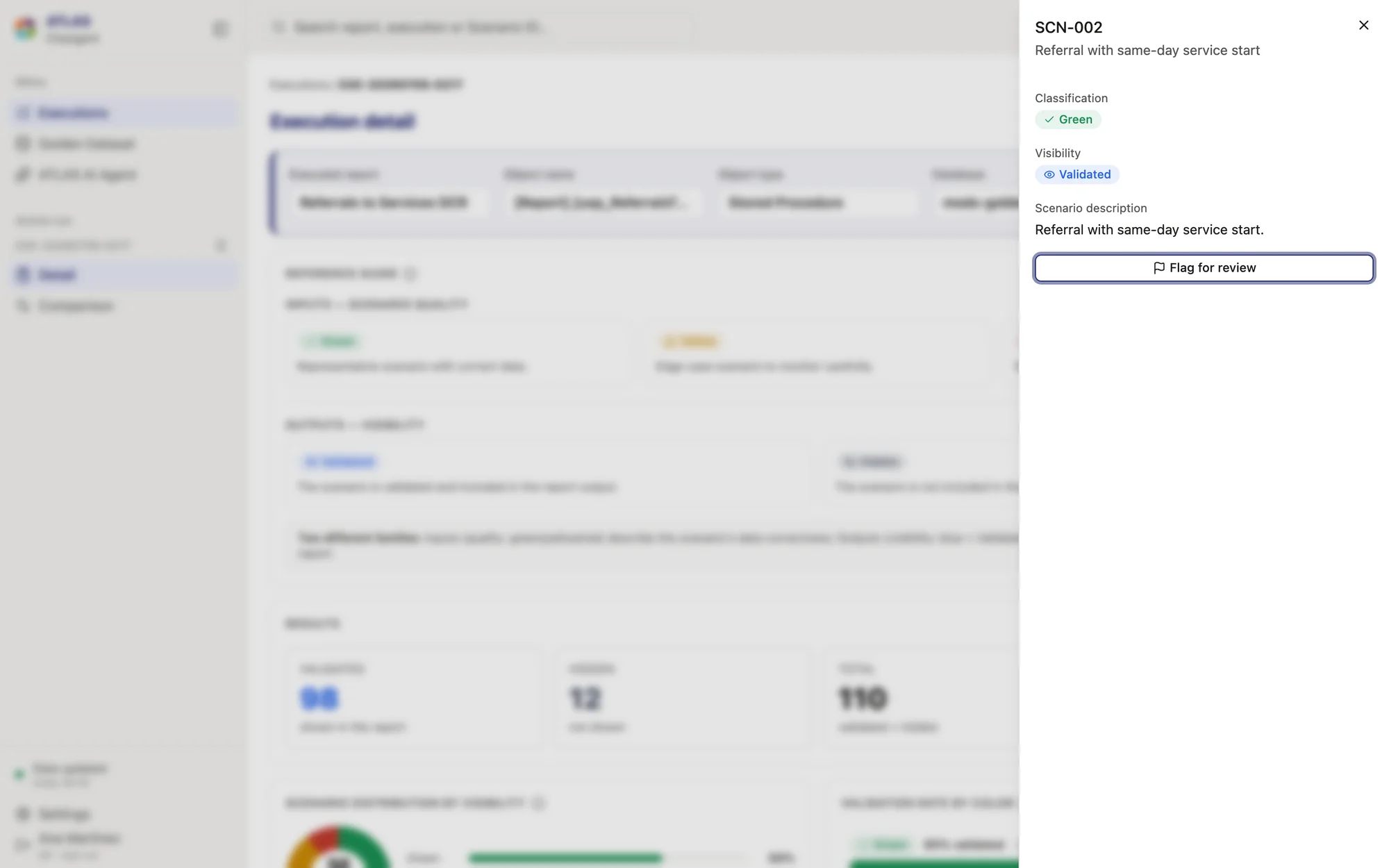
Every Golden Dataset scenario is labelled as correct data, an edge case or incorrect data. For each run of a report, QA needs to know which scenarios it showed, which it hid, and whether that’s what should happen: a correct scenario hidden, or an incorrect one shown, may be a bug.
Who it’s forShow 3 items
QA analysts
Audit each run scenario by scenario; the view that was built.
A second, big-picture role
Trends across runs; designed to derive from the QA view later.
BA and stakeholders
Reviewed the prototype and shaped its scope through change requests.
02
Problem & discovery
What we needed to understand
Two roles needed different views: QA works scenario by scenario, while a second role needed the big picture across runs. And an AI assistant was on the table, with an open question: what should it actually do?
How it worked before
Execute
Capture
Find
Compare
Visualize
The QA process in QA’s own words. The spec called it “automation”; the interface never does.
What kept coming back
Which scenarios did the report hide?
Is a hidden scenario a bug?
New scenarios look like regressions.
Two colour meanings on one screen.
03
Strategy & direction
What I decided and why
Decision 1Prototype
A neutral rule check, not a verdict
The tension
A scenario moving between shown and hidden isn’t automatically wrong; that call belongs to QA.
Options I ruled out
A “consistent / anomaly” verdict on every scenario, which implied the tool knew right from wrong.
What I chose
Flag only the two real conflicts (a correct scenario hidden, an incorrect one shown) as a neutral “Rule check”, and show nothing for every other case.
Trade-off
QA still has to judge each flag. The final wording waits on the dev team.
Result
Agreed in the BA review and written into the change request for the build.
Decision 2Prototype
Two colour families, never colour alone
The tension
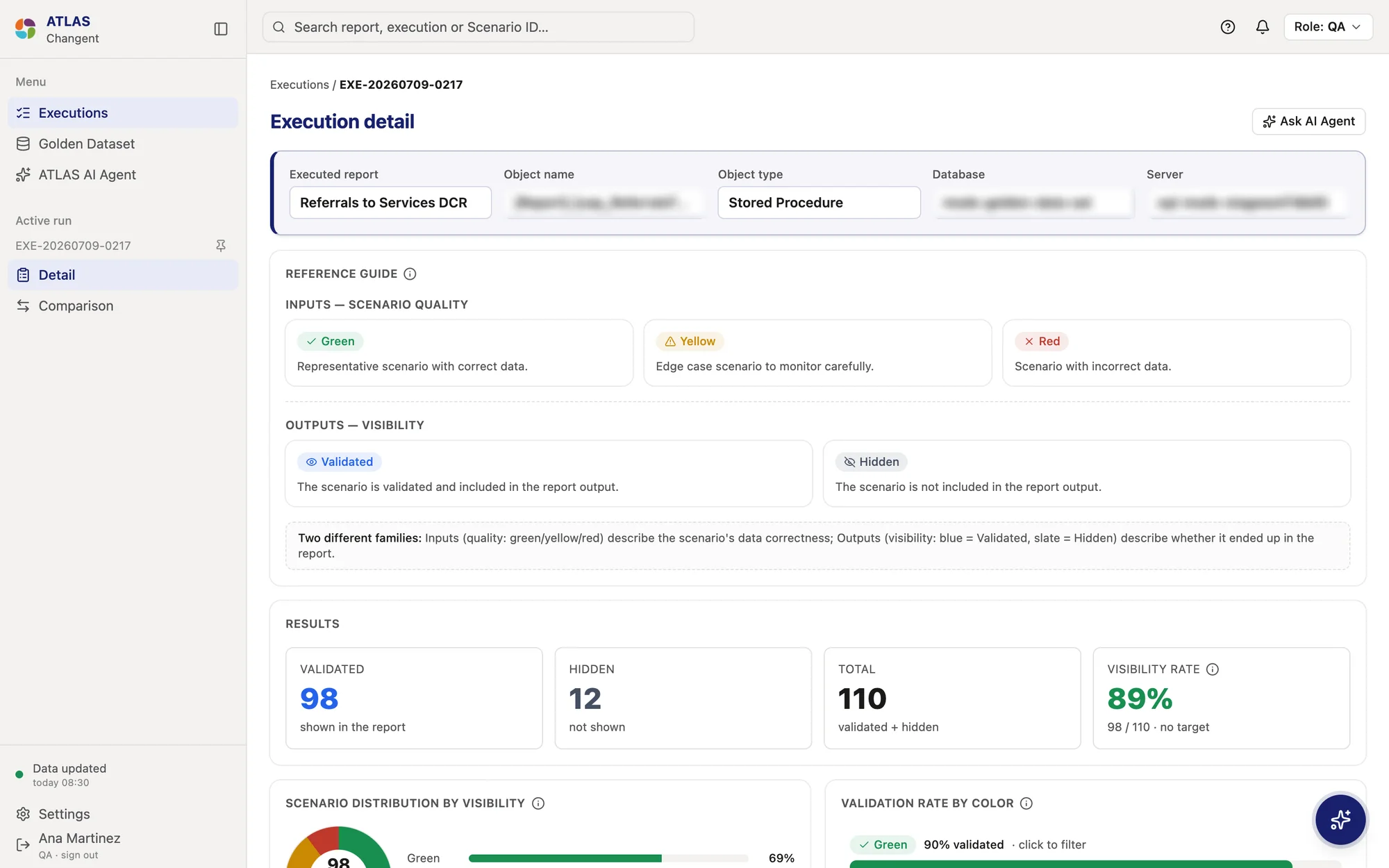
Each scenario has a quality (correct, edge case, incorrect) and a visibility (shown or hidden), two different ideas on the same row.
Options I ruled out
Reuse the brand’s success and error colours for both, which would make “hidden” read as “wrong”.
What I chose
Two separate families: green, yellow and red for quality; blue and slate for visibility. Every status carries an icon and a label.
Trade-off
Two palettes to learn, so a reference guide sits on the detail page.
Result
“Hidden” never reads as “wrong”, and status survives colour blindness and print.
Decision 3Prototype
An AI agent scoped by the people using it
The tension
Stakeholders wanted an AI assistant, but not what it should do.
Options I ruled out
Connect a real model first, which was out of scope, or a chat box with no context.
What I chose
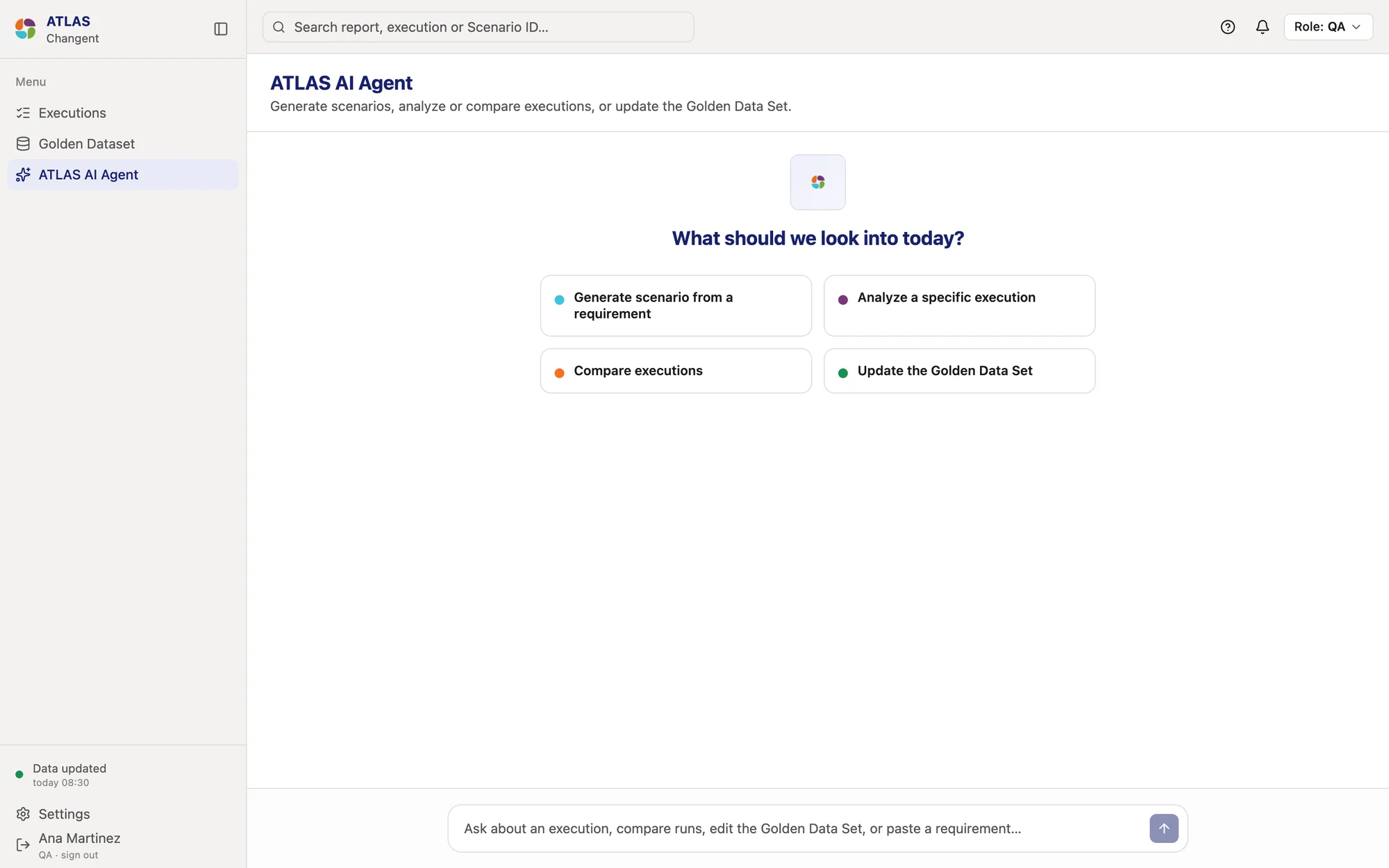
A scripted agent with four actions: generate a scenario from a requirement, analyze an execution, compare executions, and update the Golden Dataset. It opens as a full page or as a drawer that arrives with the current run in context.
Trade-off
Scripted replies can’t show how well a real model would answer.
Result
Feedback cut it to three actions, and another stakeholder restored the fourth, within 17 hours.
04
Design & validation
How the solution evolved
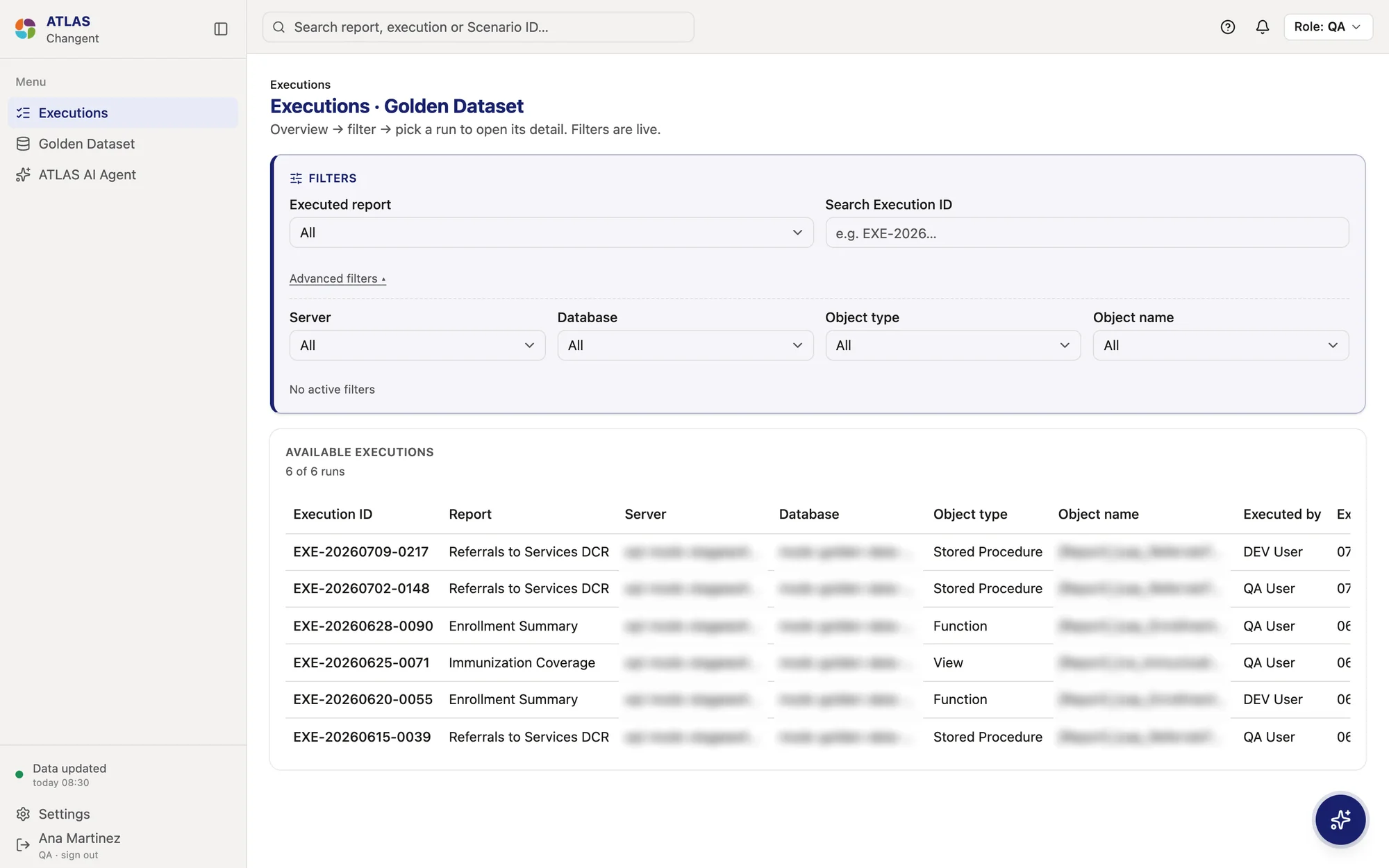
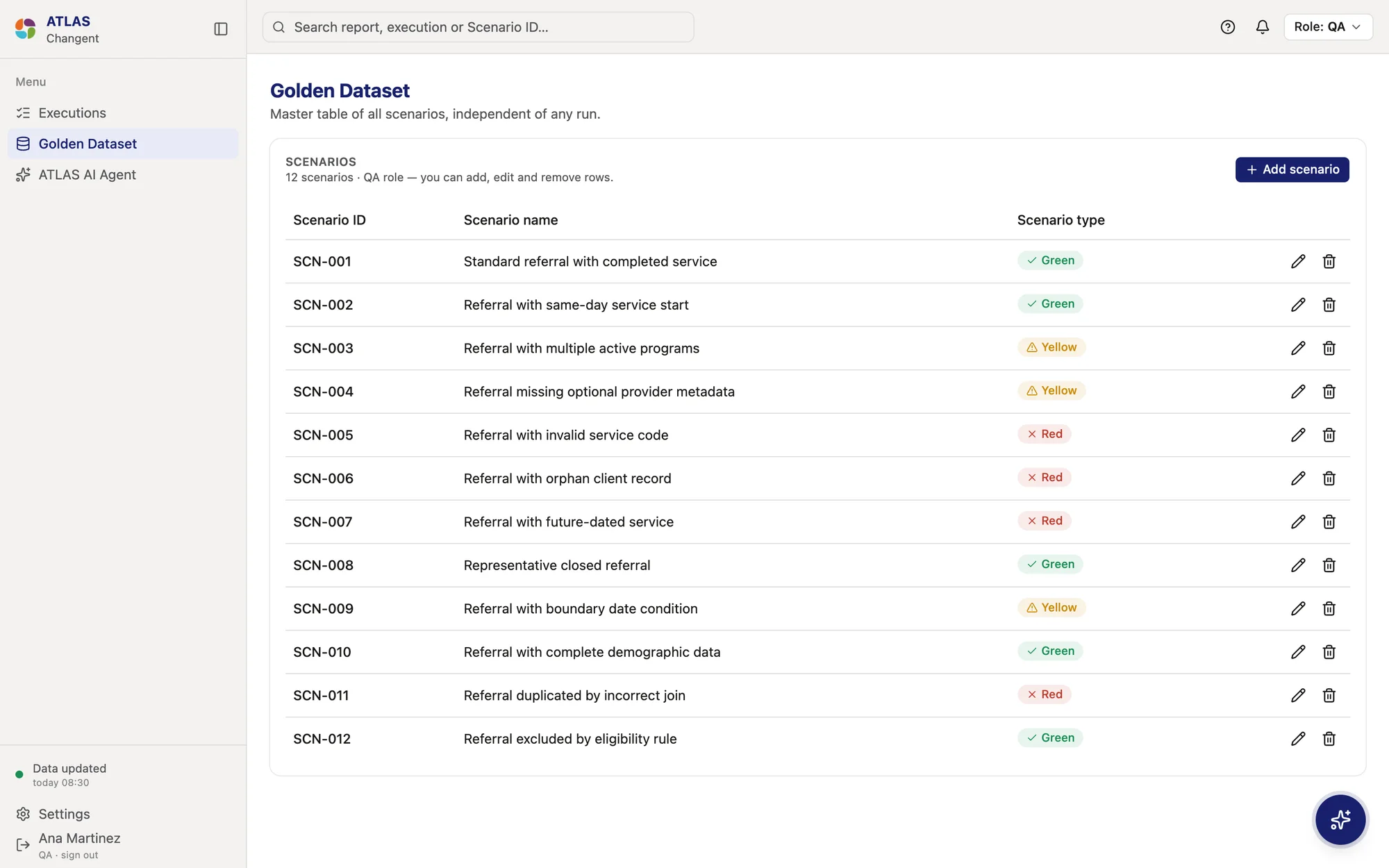
A QA web app: an Executions list with live filters, an Execution detail with results, distributions and a scenario table, a comparison with the previous run, the Golden Dataset where QA adds and edits scenarios, and the ATLAS AI Agent.
The agent is always one click away: a full page, or a drawer that opens from Detail and Comparison with the run already in context.
Golden Dataset
Executions
Detail
Comparison
AI Agent
123
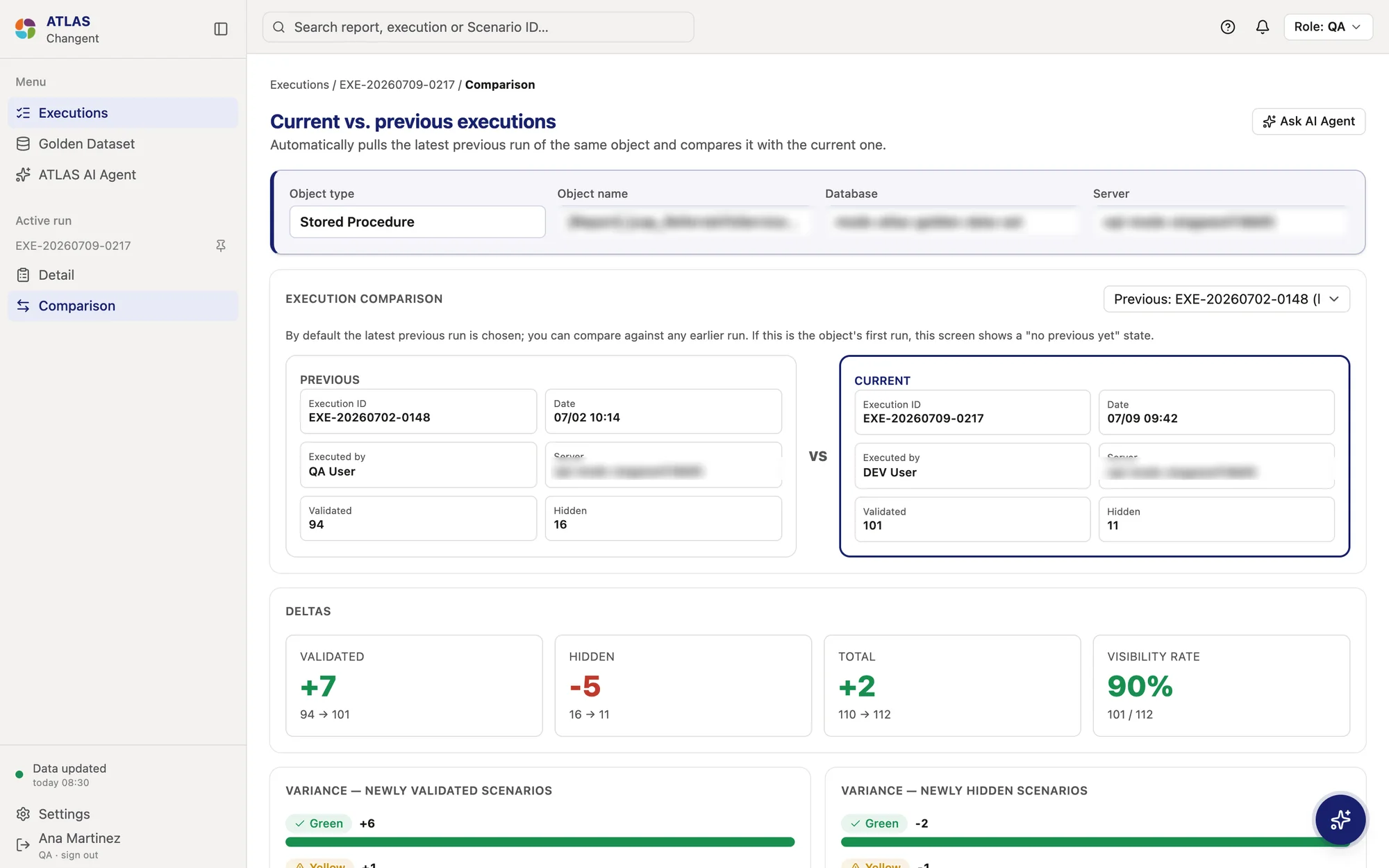
The previous run of the same object is picked automatically; any earlier run can be chosen.
Previous and current side by side, with who ran each.
Deltas show direction and size, with the before and after underneath.
Executions: overview, filter, then pick a run. Advanced filters stay folded until needed.The Golden Dataset: the master list of scenarios, which only QA can edit.How each decision was testedShow 3 items
A neutral rule check, not a verdictPrototype
Changed after the review with the BA, and written into the change request for the build.
Two colour families, never colour alonePrototype
The BA review split the reference guide into inputs and outputs; contrast follows WCAG AA.
An AI agent scoped by the people using itPrototype
Scripted replies tested the interaction, not the model. Feedback cut it to three actions and another stakeholder restored the fourth, within 17 hours.
05
Execution & collaboration
How it got built
What I owned
Discovery with the BA, wireframes, a functional spec with 7 screens and 15 edge cases, the design of the AI agent, and the build in React with Claude Code.
What others did
The BA and product stakeholders reviewed each version and set the scope through numbered change requests.
Setup
Product Designer · the only designer · July 2026
Built on the Changent Design System
ATLAS reuses the Changent tokens as they are, mapped into Tailwind and shadcn/ui, so every control matched Changent’s reports before any ATLAS-specific work. The agent’s two new accent colours extend the system instead of forking it.
What it’s made ofShow 4 items
Quality family
Green, yellow and red for correct data, edge cases and incorrect data.
Visibility family
Blue for validated, slate for hidden.
States belong to the system
Empty, error, loading, no previous run, no permission and session expired, as shared components rather than screens.
Never colour alone
Every badge pairs a colour with an icon and a label.
Edge cases, designed up frontShow 6 items
The first run of a report
“No previous run to compare yet”, instead of empty deltas.
The Golden Dataset grew
New scenarios show “N/A / new”, so growth never looks like a regression.
A rate with nothing to divide
Shown as “—/NA”, not 0%.
Long report and object names
Truncated, with the full name in a tooltip.
A slow query or an error
Skeletons after a second; a specific message with retry on error.
Thousands of scenarios
Specified with virtualization or paging; not built in the prototype.
Design engineering
The handoff was the prototype. I wrote the spec and briefs to be built from, with a definition of done, then built in Claude Code: each numbered change request applied in order with its base files attached, and reviewed back at the code level.
Small commits mapped to change requests, so late changes went through the same loop, like renaming “stored procedure” to “object name” once ATLAS had to cover any report object. Deployed on Vercel, so stakeholders reacted to a real product, not a description of one.
BA review
Wireframes & spec
Change requests
Claude Code build
Deployed prototype
06
Impact & learnings
What changed and what comes next
1 week1 week
From BA review to deployed prototype
Spec, change requests and build included.
1515
Edge cases specified
In the functional spec, before any code.
17 h17 h
From feedback to a new scope
The agent went from four actions to three, and back.
Impact by dimension
User
Not measured yet
Business
Not measured yet
Operational
One week from the BA review to a deployed prototype, with 15 edge cases specified before any code.
Before and after
What changed
Before
After
Visibility wording
“Shown” and “Validated” for the same thing
“Validated” everywhere
Flagging a scenario
A right-or-wrong verdict
A neutral rule check
The process guide
A main navigation item
A help dialog next to notifications
What a run checks
Stored procedures only
Any report object
No usage data yet: time per audit, anomalies found and QA adoption are what to measure once ATLAS runs on real data.
What I learned
Next time I’d agree on one owner for the agent’s scope before building, and test it with QA, not only stakeholders.
A prototype turns feedback into scope fast: stakeholders changed the agent twice in a day because they could try it. Next time I’d agree on one owner for the agent’s scope before building, and put the scripted agent in front of QA, not only stakeholders.